
HOW IT WORKS
Expert care.
From your phone.
Choose your care, share a few details and connect with a clinician online. From booking to follow-up, manage it all in one place.
Get started Care that fits your day.
CHOOSE. CONNECT. FEEL SUPPORTED.
Your visit, step by step.
Start on your phone, tablet or computer.
 STEP 01
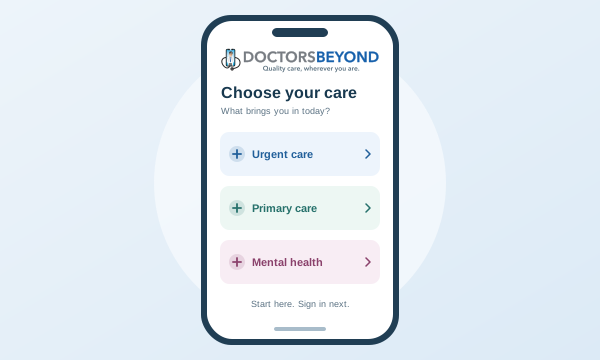
Choose care on your phone.
Tap Get Care Now, select a service and choose what brings you in. Start before creating an account—we’ll remember your selection.
No app download needed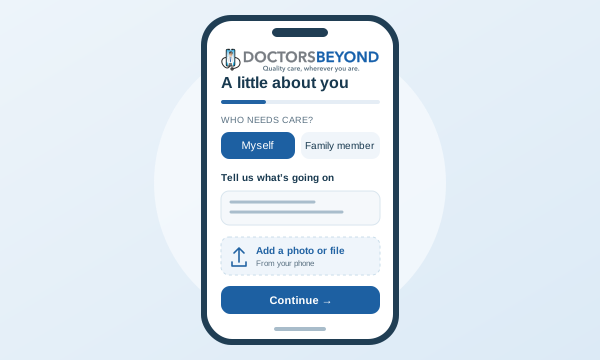 STEP 02
Make it personal.
Sign in, choose who needs care and answer a few focused questions on your phone. Upload photos or documents; for insurance, enter your plan details.
Your concern carries into your intake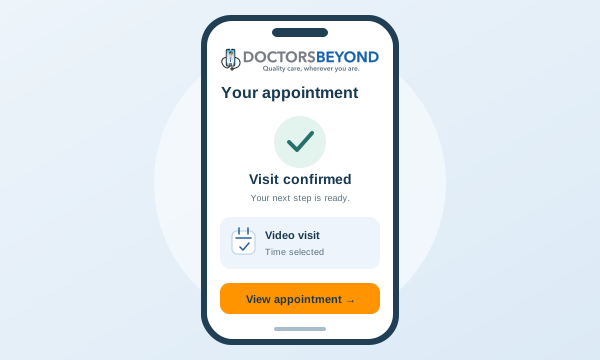 STEP 03
Confirm your visit.
Choose an available appointment time, review and complete payment, then confirm your appointment. Join from your portal and return for visit notes and next steps.
Join your scheduled visit from your portal
WHAT BRINGS YOU IN?
Start with your kind of care.
 Urgent CareQuick treatment for common illnesses and injuries
 Primary CareOngoing care for you and your family
 Mental HealthSupport for your mental well-being
 Weight LossMedical weight management, with support.Coming soon
A LITTLE PREP GOES A LONG WAY
Bring yourself.
And a few essentials.
A quiet place, a charged device and a connection you can count on.
Your first-visit checklist- Your ID & current locationFor identity and care eligibility.
- Your health detailsMedications, allergies and useful documents.
- Your payment or insurance cardReview the amount before you confirm.
Can I start on my phone?
Yes. Choose your care, complete intake and access your appointment from your mobile browser. Allow camera and microphone access when needed for your visit.
Can I book for a family member?
Yes. Choose an eligible dependent during intake or add a family member, then return to booking. Use their health details for their visit.
Do I choose an appointment before I pay?
Yes. Select an available date, time and visit format before continuing to secure payment. Then confirm your appointment. Your portal keeps your appointment and joining link together.
What if I need emergency care?
DOCTORSBEYOND is for non-emergency care. If you have a medical emergency, call 911 or go to the nearest emergency department.